Building a RAG chatbot on AWS, team-only and audit-ready
An eight-step, do-this path for a private, AWS-native RAG chatbot with memory, sessions and citations: S3, Bedrock Knowledge Base, guardrails, Cognito, DynamoDB and a single-Lambda chat API.
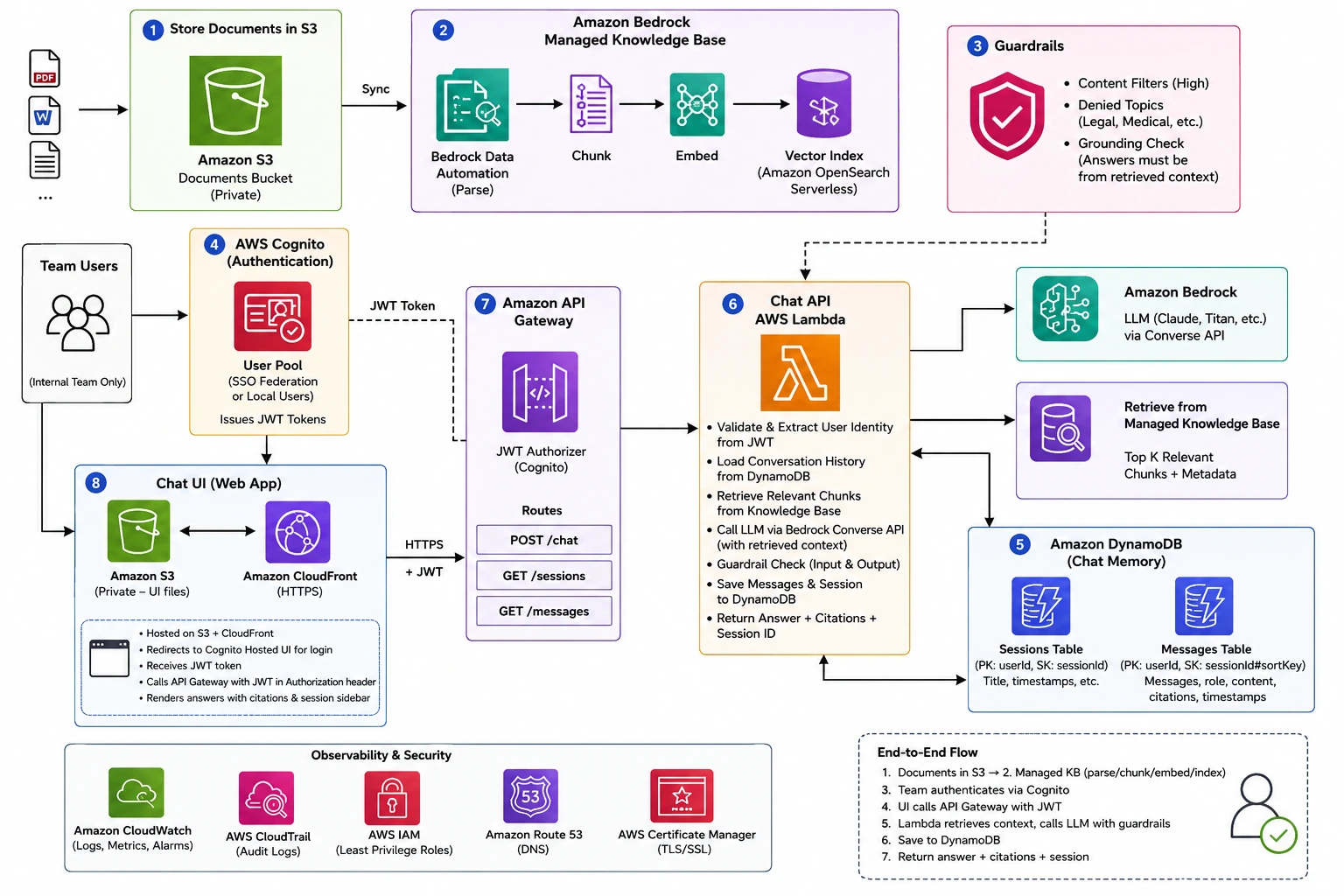
PoV - An internal team comes to you for a RAG chatbot. The docs are sensitive. Access must be limited to that team only. The company is on AWS as the CSP, so the stack should stay on AWS for compliance and auditing.
You need a private, team-only, AWS-native chatbot with memory, sessions, and citations. Here’s the do-this path.
1. Put all documents in S3. Create an S3 bucket and place all the documents. Keep Block all public access on, and name files meaningfully as they come back as citations.
2. Create a Managed Knowledge Base in Bedrock. Create a Managed Knowledge Base and point it at the S3 bucket. The defaults for parsing, chunking, and embeddings are good. Sync the data and enable reranking if results need improving.
3. Add guardrails. Users can input anything, so the system needs a guardrail. Create one with content filters set up, since grounding check is the most important part for RAG as it blocks hallucinated answers before they reach the user.
4. Lock access to the team. Use Cognito to control who gets in. Connect it to the org SSO, or create a user pool and add team members manually. Cognito issues the JWT tokens the rest of the system uses to verify identity.
5. Store chat sessions in DynamoDB. Two tables. One for sessions, one for messages. Sessions holds one row per conversation per user. Messages holds every turn with citations attached. This gives the model memory across turns and lets users browse and resume past chats.
6. Build the chat API. The Chat API is a single Lambda function with an IAM role covering CloudWatch logs, KB retrieval, LLM invocation, guardrail, and DynamoDB read/write. When a question comes in, Lambda extracts the user identity from the JWT token, loads conversation history from DynamoDB, retrieves relevant chunks from the Knowledge Base, and calls the model through the Converse API. The guardrail checks input and output before anything reaches the user. It saves both messages to DynamoDB and returns the answer with citations.
7. API Gateway. API Gateway sits between the UI and Lambda. It validates the Cognito JWT on every request and only forwards to Lambda if the token checks out. Three routes: POST /chat, GET /sessions, GET /messages. Each protected by the JWT authorizer.
8. Host the UI for the team. A single HTML file on S3 served through CloudFront. Teammates get one HTTPS link, nothing to install. It handles the Cognito login flow, posts questions to API Gateway with the JWT token, and renders answers with citations. The sidebar loads past sessions on startup so users can continue any previous conversation.